When hired as the first in-house UI/UX designer at Homesteaders Life Insurance Company, my first responsibility was to build the company’s first ever design system.
not my first rodeo
In previous positions, I have:
- created patterns and components for mature, complex, and well regarded design systems in other highly-regulated, complex information landscapes (Staff Designer, Ad Hoc LLC: Veterans Affairs contract), and
- managed a design system team during a complex platform migration (Design Lead, Ad Hoc LLC: Healthcare.gov contract).
So this is most definitely not my first Design System Rodeo*.
*I also grew up going to ACTUAL rodeos (I lived on a ranch in rural Iowa during my teen years).
Getting the word out
To socialize and educate my new colleagues about the new Homesteaders design system, I have been holding monthly design system roundtables. Through discussions and questions fielded from my new colleagues, I discovered many have never worked at an organization with a design system. There’s a lot of confusion about how a design system differs from a brand library, editorial guidelines, and other sources of truth generally owned by Marketing. To grow understanding and buy in, I’ve focused on building out header and footer patterns. Discussions these patterns open up:
- When to use branding elements in UI design and why
- How product architecture should guide what header pattern you chose
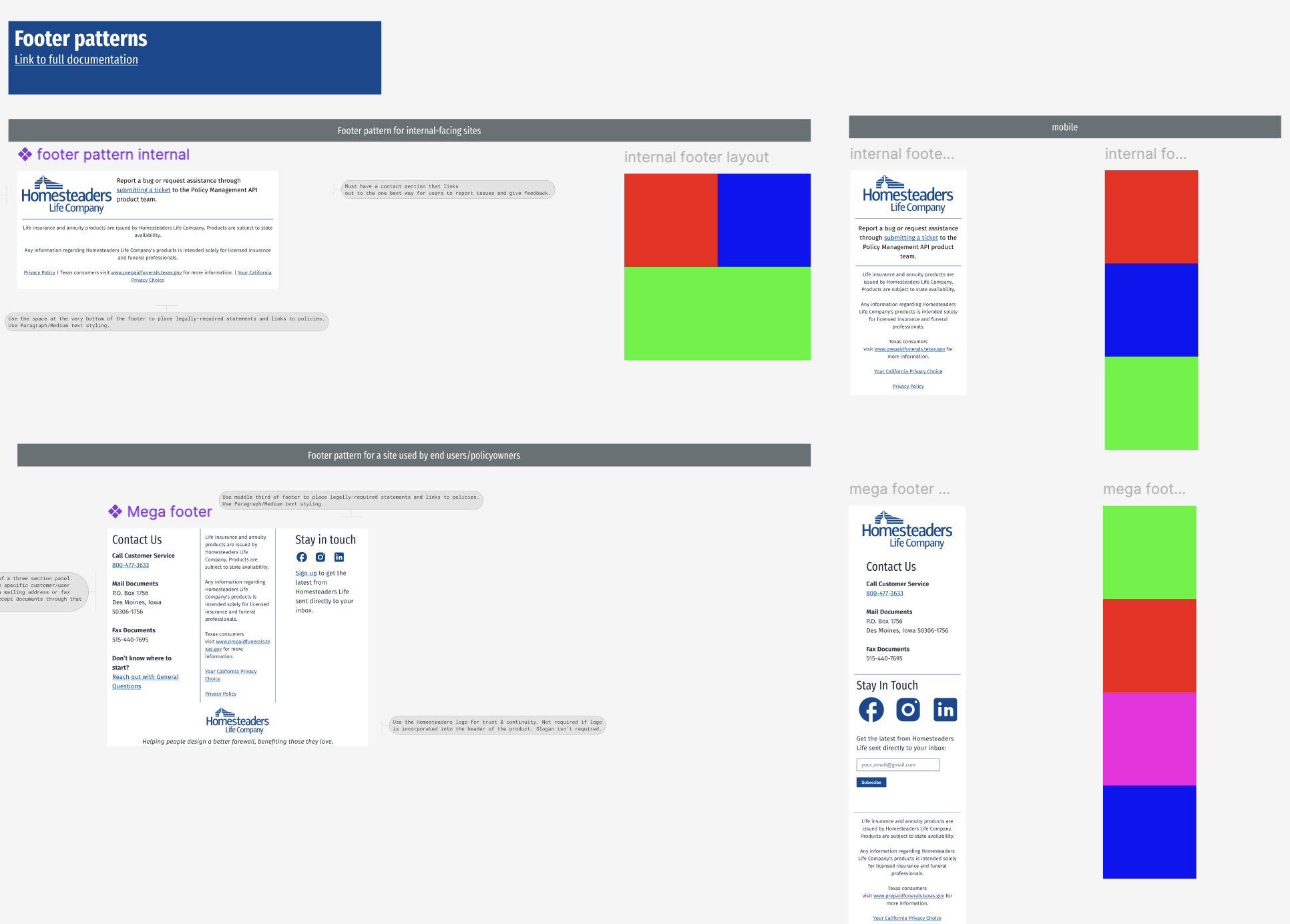
- How product user groups should guide what footer pattern you chose.
documentation
In addition to creating Figma files, I also created Word documents with design system documentation that live in a new Design System Team in Microsoft Teams. Eventually, this documentation will be moved to a company-wide content management system this is in the process of being stood up. For now, I use this Teams channel to organize and communicate about everything design system-related. One reason this systemization is important is for service design. Colleagues need to see the design system as a service that isn’t tied to one specific person (me). By funneling all meetings, documentation, and communication through a shared Team this builds folks’ understanding of the design system as an ecosystem and process, not just with design system evangelist (again, me).
Here’s the (work in progress) component and pattern documentation I created from scratch:
process
Homesteaders is new to the product operating model and specifically doesn’t have experience with placing designers into the sprint cycle. I developed a design ticket writing guide for all product owners to follow and am assisting with training for product owners and developers as they learn how to incorporate outcome-based, user-centered design work into the product “triad”. Because I am the sole designer and there is no design lead, I am strategically partnered with teams for design work while other teams are working on implementing the design system into their products in lieu of working directly with me.
The designs
The first Homesteaders Life Company design system is NOT flashy or clever or design-forward. Like my past work, I am located in an old-fashioned, highly-regulated industry with complex information ecosystem and layer, disparate user groups. This design system is rooted in education and evangelism about root UX best practices. In other words, my design work in this role is not winning any fancy design awards. But every design decision I have made in each pattern and component is deeply intentional and architected for teachable moments with developers and product owners.
Because of company-wide Figma permissions, I cannot leverage a Figma/Wordpress plugin to show my design work or link directly to the Figma files I’ve worked on. Instead, I’m providing screenshots of my work in Figma that shows some of the design tokens, variables, components, and patterns I’ve created.
header pattern

footer patterns

